
Parallels 2X MDM8.1.817 - Get APK
You'll be able to download in few seconds.
Publisher Description
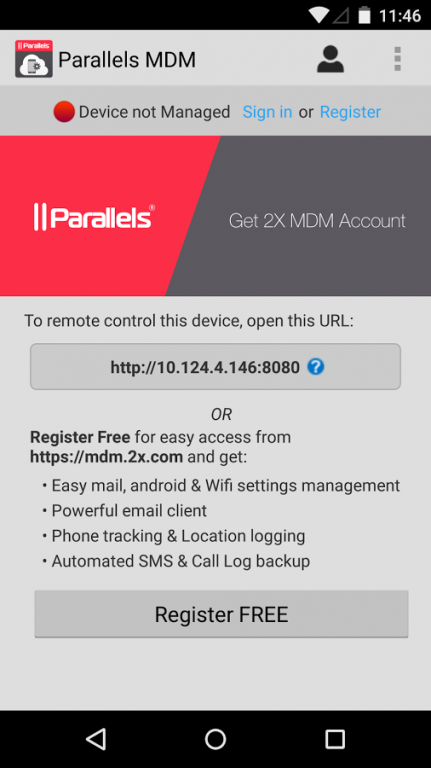
Parallels 2X Mobile Device Management app allows you to take control of your mobile phone with your keyboard and mouse via Wifi using your web browser or via internet when connected to a Parallels 2X Mobile Device Management account.
The main remote control features include (Parallels 2X Mobile Device Management account NOT required):
Camera - You can see a live stream of your mobile device camera from your browser and take pictures
SMS - You can send your sms via web interface just like from your phone and receive a popup directly on your browser (Chrome or Firefox with desktop notifications extension) when a message is received. Autocomplete, mass-messages, and other features.
Contacts - You can see the contacts present on your phone, add or delete phone numbers and emails.
Call Handler - When your phone starts to ring you will see it on your Web Desktop, and you can decide to answer (With speakerphone or headset of your phone)
Wifi Keyboard - Remotely type text on your device using your keyboard
File Manager - A complete file manager with preview functions, to navigate into your device memory. You can fast see text files and images by double-clicking on the file icon. Files can be uploaded with drag&drop too (IE doesn't work).
Sensors - You can see the values of the sensors of your phone. You will find a compass that shows the orientation of your phone and Google Maps showing the position based on Network or GPS.
Clipboard - You can see and set the clipboard of your phone absolutely in real time.
Personal Web Server - Web pages hosting on your android phone!
Shell - A simple but complete way to access the phone shell directly from the web.
Logs - Now you can see the logs directly via web interface!
Internet Explorer in compatibility mode is not supported.
Register and connect this device to a Parallels 2X Mobile Device Management account to remote control via internet and additional features. Parallels 2X Mobile Device Management is an online service that allows you to easily manage, secure, monitor, find and track your mobile phones, tablets or notebook computers.
The main features include (Parallels 2X Mobile Device Management account required):
Bridge Mode -Take control of your device through an internet connection from anywhere.
Device Tracking – Simple, precise tracking of connected mobile devices using Bing Maps
Deploy Applications – Manage apps to groups of Android phones
Security – Remotely lock or wipe corporate data from abused, lost or stolen devices
Administration Portal – Receive alerts, send messages to your mobile devices and audit your users
Take full advantage of your mobile devices without creating a management nightmare. Sign Up for a Free Parallels 2X Mobile Device Management account at https://mdm.2x.com/Signup/SignupForm or directly from this application.
#IMPORTANT NOTE
Parallels 2X Mobile Device Management is provided free of charge for up to 5 devices, but without technical support.
Questions about Parallels 2X Mobile Device Management should be posted here
http://parallels.com/eu/products/mdm/support/
And read our manual:
http://www.2x.com/manual/mdmmanual.pdf
Please note that these forums are answered by users, not Parallels staff. If you need technical assistance from Parallels, you would need to purchase a commercial Parallels 2X Mobile Device Management account
About Parallels 2X MDM
The company that develops Parallels 2X MDM is 2X Software Ltd. The latest version released by its developer is 8.1.817.
To install Parallels 2X MDM on your Android device, just click the green Continue To App button above to start the installation process. The app is listed on our website since 2015-08-17 and was downloaded 0 times. We have already checked if the download link is safe, however for your own protection we recommend that you scan the downloaded app with your antivirus. Your antivirus may detect the Parallels 2X MDM as malware as malware if the download link to com.tcx.mdm is broken.
How to install Parallels 2X MDM on your Android device:
- Click on the Continue To App button on our website. This will redirect you to Google Play.
- Once the Parallels 2X MDM is shown in the Google Play listing of your Android device, you can start its download and installation. Tap on the Install button located below the search bar and to the right of the app icon.
- A pop-up window with the permissions required by Parallels 2X MDM will be shown. Click on Accept to continue the process.
- Parallels 2X MDM will be downloaded onto your device, displaying a progress. Once the download completes, the installation will start and you'll get a notification after the installation is finished.
Program Details
System requirements
Download information
Pricing
Version History
version 8.1.817
posted on 2015-08-17
New features:,- Retire Device,- Termination of Account,- Configurable Data Purging,- Geofencing,- Disable App removal iOS,- Send Data Usage warning,- License Limit reached/exceeded,- Aquamail 1.5.7,- Update of MDM EULA,- Update of Apple Push Certificates,and additional fixes.
version 6.3.475
posted on 2013-06-28
Several fixes and updates
Disclaimer
External Download
We do not host Parallels 2X MDM on our servers. We did not scan it for viruses, adware, spyware or other type of malware. This app is hosted by Galad and passed their terms and conditions to be listed there. We recommend caution when installing it.
The APK Download link for Parallels 2X MDM is provided to you by apps112.com without any warranties, representations or guarantees of any kind, so access it at your own risk.
If you have questions regarding this particular app contact the publisher directly. For questions about the functionalities of apps112.com contact us.
